CSV test data generator
Build a schema from 93 realistic field types and download it as clean, spreadsheet-ready CSV — up to 100,000 rows, no signup, 100% client-side.
What the output looks like
id,first_name,last_name,email,city,registered_at
1,Elena,Rossi,elena.rossi7@example.org,Vienna,2025-03-18T09:41:26Z
2,Marco,Schneider,marco.s@example.com,Izmir,2024-11-02T14:07:52Z
3,Aisha,Yılmaz,aisha.yilmaz@example.net,Oslo,2025-01-27T08:15:03Z
Why CSV?
CSV is still the lingua franca of tabular data: every spreadsheet, BI tool and database
import path understands it. It is the format to reach for when the data ends up in
Excel or Google Sheets, a Postgres COPY or MySQL LOAD DATA
statement, or a colleague's inbox.
CSV-specific options
- Header row — toggle the first line of column names on or off to match your importer.
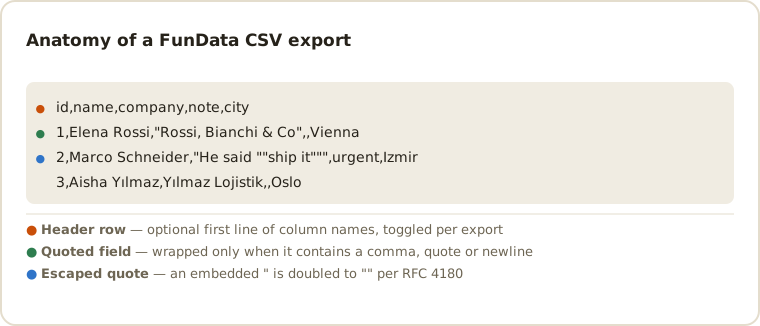
- Automatic quoting — values containing commas, quotes or newlines are quoted and escaped correctly, so full addresses and free-text sentences won't break your parser.
- Blank % — any field can emit empty cells at a rate you choose, which is the honest way to test how your pipeline copes with missing values.
- Seed — set one and every export is byte-identical, so a fixture checked into your repo stays stable.
Loading CSV into your tools
Every one of these expects the same file. Keep the header row on and let the tool infer column names, or turn it off when you are appending to a table that already exists.
# PostgreSQL — client-side, so no server file permissions needed
\copy customers FROM 'fundata_1000_rows.csv' WITH (FORMAT csv, HEADER true);

# MySQL / MariaDB
LOAD DATA LOCAL INFILE 'fundata_1000_rows.csv'
  INTO TABLE customers
  FIELDS TERMINATED BY ',' ENCLOSED BY '"'
  LINES TERMINATED BY '\n'
  IGNORE 1 ROWS;

# SQLite
.mode csv
.import --skip 1 fundata_1000_rows.csv customers

# pandas — keep IDs as text so leading zeros survive
df = pd.read_csv('fundata_1000_rows.csv', dtype={'id': str})

# DuckDB — types inferred, no table needed up front
SELECT * FROM read_csv_auto('fundata_1000_rows.csv');
CSV compatibility and edge cases
Output uses commas as delimiters and standard double-quote escaping. A value is quoted
only when it contains a comma, quote or newline; embedded quotes are doubled. UTF-8
preserves international names such as Yılmaz or Sørensen. Blank fields stay empty, so
you can test how Excel, database imports and ETL jobs distinguish an empty cell from a
populated value. For typed values and explicit nulls, use JSON instead.
The awkward parts of CSV are not in the specification — they are in what the receiving tool does with a perfectly valid file. These are the ones worth deliberately generating data for:
-
Leading zeros disappear. A postcode or product code like
00123is a valid string, but a spreadsheet that auto-detects types will store it as the number 123. Generate a batch of zero-padded IDs and you can prove whether your importer preserves them. -
Long digit strings turn into scientific notation. A 16-digit card
number or a large account number often lands in Excel as
1.23457E+15, silently losing the last digits. -
Dates get re-interpreted.
03/04/2025is March 4th or April 3rd depending on the reader's locale. ISO 8601 timestamps avoid the ambiguity, which is why the date fields default to them. -
Empty is not the same as null. CSV has no null: an empty cell is an
empty string, and each importer decides whether that becomes
NULL,''or a validation error. Blank % exists to make that decision visible before production data does. -
Line endings and the byte-order mark. Files are written with UTF-8
and
\nline endings, no BOM. Some Windows tools expect\r\nor a BOM before they will treat the file as UTF-8; if accented characters arrive mangled, that is almost always the cause rather than the data.
Line endings, BOMs and joining files
Three CSV details cause most of the trouble that is not about quoting, and none of them are visible when you open the file.
Line endings. RFC 4180 specifies CRLF, and plenty of real-world CSV uses bare LF. Almost every modern parser accepts both, but a naive split on \r\n will produce a stray \r at the end of every field when handed a Unix file — and a naive split on \n leaves one when handed a Windows one. If a parser you wrote is producing values with an invisible trailing character, this is why.
The byte-order mark. Excel on Windows writes a UTF-8 BOM and uses its presence to decide the file is UTF-8 rather than the system code page. Parsers that do not strip it hand you a first column name of id instead of id, which is the cause of the classic "my first column is undefined" bug. Exports here are plain UTF-8 without a BOM, which is correct and occasionally means telling Excel the encoding explicitly during import.
Joining exports. A single export is capped at 100,000 rows. For more, export several times with a different seed each time and concatenate — remembering that every file carries its own header:
# keep the header from the first file only
head -n 1 part-1.csv > all.csv
tail -q -n +2 part-*.csv >> all.csv
Use a different seed per part. The same seed produces the same rows, so concatenating identical seeds gives you one dataset repeated rather than a larger one.
Common CSV questions
Can I open the generated CSV in Excel or Google Sheets?
Yes. Keep the header row enabled, download the UTF-8 file and import it with comma as the delimiter. The same schema can also produce spreadsheet sample data as TSV when tabs are a better fit.
Can I reproduce the same CSV later?
Yes. Enter a seed before exporting. The same seed and schema produce byte-identical output, which is useful for committed fixtures and repeatable QA runs.
Can I change the delimiter to a semicolon or pipe?
The CSV export is comma-delimited. If you need another separator, TSV covers the tab case directly; for anything else, exporting CSV and replacing the delimiter downstream is safer than generating it, because a semicolon file still needs comma-aware quoting rules applied to the values themselves.
How do I stop Excel mangling IDs and postcodes?
Don't double-click the file — that path gives you no type control. Use Data → From Text/CSV, then set the affected columns to Text in the import preview. Generating a column of zero-padded values first is a quick way to confirm the setting actually took effect.
What is the largest CSV I can generate?
100,000 rows per export. Generation and download both happen in your browser, so wide schemas at the top of that range take a moment to serialize. For a bigger fixture, export several times with different seeds and concatenate — strip the header from every file after the first.
Is the data safe to commit to a repository?
Yes. Every value is synthetic: emails use reserved documentation domains, card numbers use the published test prefixes, and no row is derived from a real person. The methodology page sets out exactly what each generator draws from.
Need a database-ready fixture? See the database test-data guide.
Other formats
The same schema exports to all six dropdown formats — switch with one control: TSV, JSON, NDJSON, SQL, XML — plus a separate one-click .xlsx download. New here? Start with the getting-started guide or the full field type reference.
Last updated