TSV test data generator
The same 93 realistic field types, exported as tab-separated values — ideal for clipboard pastes into spreadsheets and for tools that choke on comma quoting.
What the output looks like
order_id	product	quantity	unit_price
b3c9a1f2-6d4e-4a7b-9c1d-2f8e5a6b7c8d	Ergonomic Bamboo Keyboard	2	129.99
7f2e0d94-1c3b-4e5a-8f6d-9a0b1c2d3e4f	Rustic Steel Lamp	1	54.50
Why TSV?
Tab-separated values sidestep CSV's biggest annoyance: commas inside the data. Because
real-world values almost never contain tabs, TSV rows rarely need quoting at all —
which makes the files trivially cut-, awk- and
paste-friendly, and means a copied block drops straight into Excel or
Google Sheets with columns intact.
Where TSV shines
- Spreadsheet pastes — copy the raw output and paste it directly into a sheet; every tab becomes a column.
- Unix pipelines —
cut -f2,sort -k3and friends work without a CSV parser. - MySQL imports —
LOAD DATA INFILEdefaults to tab separators, so TSV loads with zero extra flags. - Header row & Blank % — same controls as CSV: toggle the header, inject empty cells to simulate missing data.
Working with TSV on the command line
This is where TSV earns its keep: because the delimiter never appears inside a value, the standard Unix text tools are enough and no CSV parser is involved.
# Average the fourth column, skipping the header
awk -F'\t' 'NR>1 { sum += $4 } END { print sum/(NR-1) }' fundata_1000_rows.tsv

# Pull two columns out, keeping the tab separator
cut -f2,4 fundata_1000_rows.tsv

# Sort by the numeric third column, descending
sort -t$'\t' -k3,3nr fundata_1000_rows.tsv

# Count rows per value of column 2
tail -n +2 fundata_1000_rows.tsv | cut -f2 | sort | uniq -c | sort -rn

# MySQL: tab is already the default, so no FIELDS clause is needed
LOAD DATA LOCAL INFILE 'fundata_1000_rows.tsv' INTO TABLE orders IGNORE 1 ROWS;
TSV compatibility and edge cases
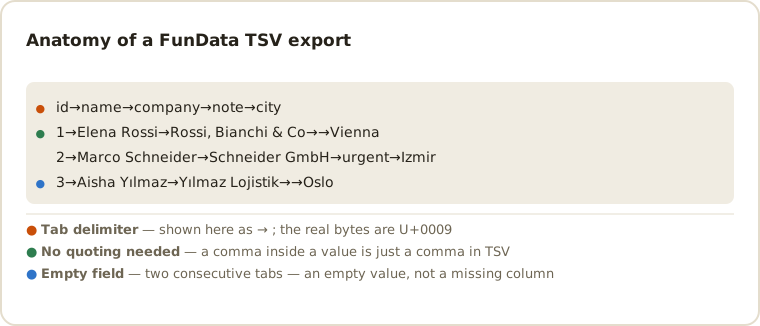
Every record occupies one line and every field is separated by a literal tab. Text is encoded as UTF-8, so non-English names survive spreadsheet and command-line workflows. Because tabs are rare in ordinary values, TSV avoids much of CSV's quoting overhead; when a consumer requires RFC-style comma-separated input, switch to CSV. Blank percentages generate empty fields between delimiters, making missing-value tests easy to spot.
- TSV has no agreed escaping rule. This is the real trade-off against CSV. RFC 4180 tells every CSV parser what a quote means; TSV has no such document, so tools disagree about what a tab inside a value would even look like. The format works because that case is avoided, not because it is handled.
- Empty field or missing column? Two consecutive tabs mean an empty value. A row with fewer tabs than the header has fewer columns — a different defect, and one some parsers pad silently instead of rejecting. Blank % produces the first case so you can confirm your importer tells them apart.
-
Trailing whitespace is invisible and significant. A value ending in
a space looks identical in a terminal but compares unequal. Piping through
cat -Amakes tabs (^I) and line ends ($) visible when a diff refuses to make sense. -
Locale changes how
sortbehaves. Sorting names with accents gives different results underLC_ALL=Cthan under a UTF-8 locale. Generating international names is the quickest way to catch a pipeline that assumes ASCII ordering.
TSV has no escape hatch — and that is the point
The structural difference between TSV and CSV is not the delimiter, it is what happens when a value contains one. CSV answers with quoting rules: wrap the field, double any internal quote, and a parser has to implement a small state machine to read it back. The classic tab-separated format has no such mechanism at all — a tab inside a value simply cannot be represented.
That sounds like a weakness and is usually a strength. Splitting a TSV line is line.split('\t'), correct and complete, with no state machine, no quoting edge cases and no ambiguity about what a lone quote character means. Every field is exactly what lies between two tabs. That is why the format survives in bioinformatics, log processing and command-line pipelines, where the parser is often three lines of awk.
The trade is that you have to know your data contains no tabs and no newlines. Generated fields here never contain a tab, so the export is well-formed by construction; if you later merge in text from elsewhere — a description field, a pasted comment, anything a user typed — check it first. A single stray tab shifts every subsequent column on that row, and the failure is silent: the file still parses, it is just wrong from that column onwards.
If your data genuinely might contain tabs, use CSV and accept the quoting, or NDJSON where the escaping is the serializer's problem rather than yours.
Common TSV questions
Is TSV the same as tab-delimited text?
Yes. TSV, tab-separated values and tab-delimited text describe the same simple table format: rows are lines and columns are separated by tab characters.
When should I choose TSV instead of CSV?
Choose TSV for spreadsheet pastes, Unix tools and data containing many commas. Choose CSV when an importer explicitly expects comma delimiters or RFC-style quoting.
What happens if a generated value contains a tab?
None of the field types emit tab characters, so the case doesn't arise in practice. That is precisely why TSV can skip quoting: the guarantee comes from the data, not from an escaping rule. If you paste your own values into a custom list, keep them tab-free.
Can I paste TSV straight into Excel or Google Sheets?
Yes, and this is TSV's strongest use. Copy the output and paste into a sheet — every tab becomes a column boundary with no import dialog at all. CSV pasted the same way lands in a single column.
Does TSV support explicit nulls?
No. Like CSV, TSV has only empty strings, and each importer decides whether an empty field becomes NULL. When the distinction matters, use JSON or NDJSON, which emit a real null.
For a practical spreadsheet workflow, read the Excel and Sheets sample-data guide.
Other formats
The same schema exports to all six formats — switch with one dropdown: CSV, JSON, NDJSON, SQL, XML. New here? Start with the getting-started guide or the full field type reference.
Last updated