XML test data generator
Well-formed <records> documents with correct escaping, built from the same 93 realistic field types — for the enterprise integrations, SOAP endpoints and XSLT pipelines that still speak XML.
What the output looks like
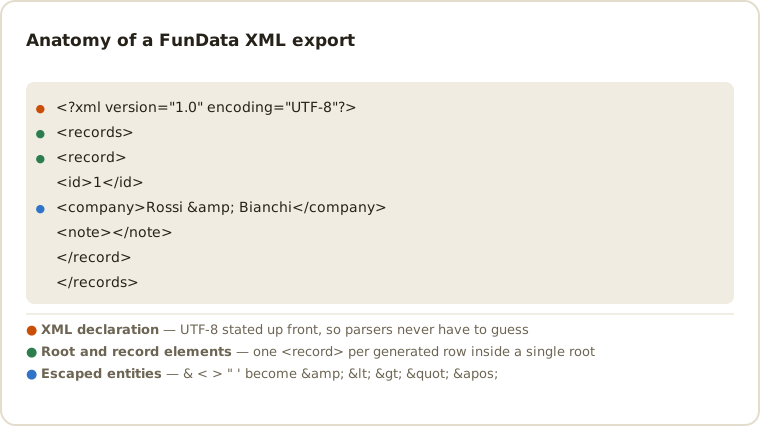
<?xml version="1.0" encoding="UTF-8"?>
<records>
  <record>
    <id>1</id>
    <full_name>Elena Rossi</full_name>
    <email>elena.rossi7@example.org</email>
  </record>
</records>
Why XML?
Plenty of production systems — ERP integrations, banking interfaces, SOAP services,
print pipelines — still exchange XML, and they deserve realistic test payloads too.
The export wraps each row in a <record> element under a single
<records> root, with field names as element names and all special
characters (&, <, quotes) properly escaped.
Where XML export helps
- Legacy imports — feed batch interfaces that only accept XML drops.
- XSLT & XPath tests — realistic documents make transformation bugs visible early.
- Schema mapping — field names become element names, so a
customer_emailfield yields<customer_email>exactly. - Blank % — blanks render as empty elements, the classic edge case in XML consumers.
Validating and transforming the output
# Well-formedness only — no schema needed
xmllint --noout fundata_1000_rows.xml && echo "well-formed"

# Validate against your own contract in CI
xmllint --noout --schema contract.xsd fundata_1000_rows.xml

# Count records and pull a single field with XPath
xmllint --xpath 'count(/records/record)' fundata_1000_rows.xml
xmllint --xpath '/records/record[1]/email/text()' fundata_1000_rows.xml

# Reshape into the envelope your integration actually expects
xsltproc to-soap.xsl fundata_1000_rows.xml > payload.xml

# Pretty-print a file that arrived on one line
xmllint --format fundata_1000_rows.xml
Going the other way — XML you already have, and something downstream that wants JSON — is a different job from generating, and there is a page for it: the XML to JSON converter runs in the browser and documents the decisions the conversion has to make, including what happens to attributes and to repeated sibling elements.
XML structure and compatibility
Files include an XML declaration and a single <records> root, so the
result is a complete document rather than a fragment. Field names are sanitized for
element use, text is UTF-8 and reserved characters are entity-escaped. The generator
does not attach an XSD or namespaces because integration contracts vary; use the stable,
seeded output as a fixture and validate it against your own schema in CI.
-
Element names have rules that column names don't. An XML name cannot
begin with a digit or contain a space, so field names are sanitized before they become
tags. Name your fields
customer_emailrather thanCustomer Emailand the mapping stays one-to-one and predictable. -
Empty element or absent element? Blank % produces
<note></note>— present but empty, which is not the same as omitting the element, and not the same asxsi:nil="true". Consumers routinely conflate all three; this is the cheapest way to find out whether yours does. -
Only five entities are predefined.
&,<,>,"and'are the whole set. Anything else — , for instance — requires a DTD and will fail a plain parser, which is why accented characters are emitted as literal UTF-8 rather than as entities. -
Attributes are not used. Every value is element text. That keeps the
output uniform and easy to XPath, but if your contract expects
<record id="1">you will need an XSLT step. - Large documents are not streamable by default. Unlike NDJSON, a 100,000-record XML file is one document; a DOM parser will hold all of it in memory. Use a SAX or pull parser at that size.
Common XML questions
Is the generated XML well-formed?
Yes. Each record is nested under one root element, tags are balanced and special characters in values are escaped. You can verify any export with xmllint --noout.
Can I generate SOAP envelopes or a custom XML hierarchy?
The built-in export intentionally uses a simple records/record structure. Generate the row data first, then transform it with XSLT or application code when your contract needs namespaces or nested envelopes.
Can I get values as attributes instead of elements?
Not from the export itself — every value is element text, which keeps the document uniform and easy to query with XPath. An XSLT step converts elements to attributes in a few lines if your contract requires it.
How are blank values represented?
As an empty element: <note></note>. That is deliberately different from omitting the element and from xsi:nil="true" — three states consumers often treat as one. Blank % lets you generate the case and check.
Is there an XSD or namespace?
No. Integration contracts differ too much for a generated schema to be useful, so the output is plain, namespace-free XML. Validate it against your own XSD with xmllint --schema — a seeded export makes that a stable CI check.
Will a 100,000-record file load in my parser?
It is one document, so a DOM parser holds the whole thing in memory. At that size use a streaming SAX or pull parser, or switch to NDJSON, where each record is independently parseable.
For integration and regression fixtures, see the QA test-data guide.
Other formats
The same schema exports to all six formats — switch with one dropdown: CSV, TSV, JSON, NDJSON, SQL. New here? Start with the getting-started guide or the full field type reference.
Last updated