SQL test data generator
Turn a schema into ready-to-run INSERT statements — with an optional CREATE TABLE whose column types are inferred from your fields. Seed a dev database in one command.
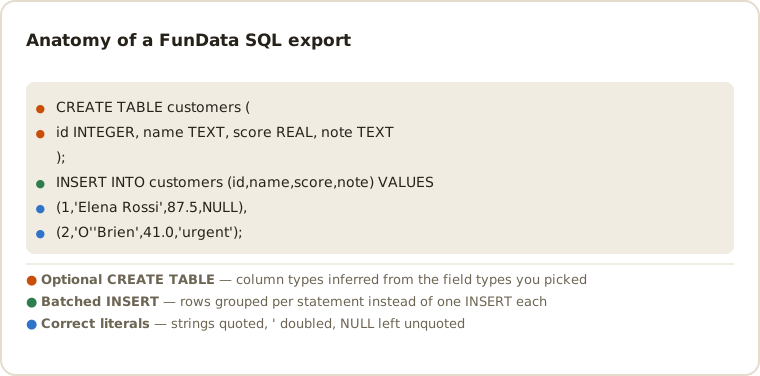
What the output looks like
CREATE TABLE customers (
  id INTEGER,
  full_name TEXT,
  email TEXT,
  is_active BOOLEAN
);
INSERT INTO customers (id, full_name, email, is_active) VALUES
  (1, 'Elena Rossi', 'elena.rossi7@example.org', TRUE);
Why SQL export?
Sometimes the fastest way to a populated dev database is a plain .sql file:
no ETL tool, no ORM seeder, just psql -f or mysql <. The
generator writes standard INSERT statements, escapes quotes correctly,
renders blanks as NULL, and can prepend a CREATE TABLE whose
column types (integer, decimal, boolean, text) are inferred from your field types.
SQL-specific options
- Table name — set it once; it is used in both the
CREATE TABLEand everyINSERT. - Create table toggle — turn it off when the table already exists and you only want rows.
- Seed — the same seed regenerates the exact same script, so your whole team seeds identical databases.
Applying the script
# PostgreSQL — stop at the first error instead of ploughing on
psql -d mydb -v ON_ERROR_STOP=1 -f fundata_1000_rows.sql

# MySQL / MariaDB
mysql -u dev -p mydb < fundata_1000_rows.sql

# SQLite
sqlite3 dev.db < fundata_1000_rows.sql

# Dry run inside a transaction you never commit
psql -d mydb -1 -c '\i fundata_1000_rows.sql' -c 'ROLLBACK;'

# Docker-based CI: seed a throwaway database on startup
docker run -d -e POSTGRES_PASSWORD=x \
  -v "$PWD/fundata_1000_rows.sql:/docker-entrypoint-initdb.d/seed.sql" postgres:17
Database compatibility and safety
The generated script uses portable SQL literals: text is single-quoted with embedded
quotes escaped, numbers remain unquoted, booleans use TRUE/FALSE
and missing values become NULL. It is designed for disposable development
and test databases. Review inferred column sizes, constraints and dialect-specific
identifiers before applying a script to an existing schema; the tool never connects to your database.
Portable SQL is a smaller language than any one dialect, so a few things are worth checking before a script meets a schema you care about:
-
BOOLEANis not universal. PostgreSQL has a real boolean type; MySQL treats it asTINYINT(1), and SQLite stores 0 and 1. TheTRUE/FALSEliterals work in all three, but the column type inCREATE TABLEmay need adjusting. -
No primary keys, indexes or constraints are emitted. The inferred
CREATE TABLEis a plain column list. That is deliberate — guessing a key would be wrong more often than right — but it means the script populates a table rather than defining a schema you should keep. - Identifiers are unquoted. A table or column name that collides with a reserved word, or that needs case preserved in PostgreSQL, has to be quoted by hand. Sticking to lowercase names with underscores avoids the whole question.
-
Apostrophes are the escaping case that matters. Names like O'Brien
are emitted as
'O''Brien'— a doubled quote, which is the SQL standard and works everywhere. Generating a batch of Irish surnames is a quick way to prove a downstream tool handles them. -
Rows are batched into multi-row
INSERTs. That is far faster than one statement per row, but it also means a single bad row rejects its whole batch. Run withON_ERROR_STOPso a partial load doesn't look like a success.
Common SQL questions
Which databases can use the generated SQL?
The simple inserts work with PostgreSQL, MySQL and SQLite in common schemas. Dialect-specific types, quoted identifiers, auto-increment clauses and constraints may need a small edit.
Can I generate rows without CREATE TABLE?
Yes. Disable the Create table option and the export contains only INSERT statements for the table name you provide.
Are primary keys, indexes or foreign keys included?
No. The inferred CREATE TABLE is a plain column list — guessing a key or a relationship would be wrong more often than right. Define the schema in your migrations and use this script to populate it, ideally with Create table switched off.
How are apostrophes in names handled?
By doubling, which is the SQL standard: O'Brien becomes 'O''Brien'. This works in PostgreSQL, MySQL and SQLite alike, and no backslash escaping is used, since that is a MySQL-specific extension.
Is it safe to run against a real database?
Treat it as a development and test tool. The script only ever inserts, and never connects to anything itself, but it emits no transaction wrapper of its own — run it inside one, or against a disposable database, so a partial load can be rolled back.
Why is my import slow for 100,000 rows?
Usually indexes and per-statement commits rather than the script. Loading into a table with its indexes created afterwards, inside a single transaction, is dramatically faster. For bulk loading specifically, CSV with COPY or LOAD DATA beats INSERT statements by a wide margin.
Plan realistic schemas and repeatable seeds with the database test-data guide.
Other formats
The same schema exports to all six formats — switch with one dropdown: CSV, TSV, JSON, NDJSON, XML. New here? Start with the getting-started guide or the full field type reference.
Last updated