NDJSON test data generator
One JSON object per line, up to 100,000 lines — the format that streams: pipe it through jq, bulk-load it into Elasticsearch, or feed it to BigQuery. Fully client-side.
What the output looks like
{"reading_id":"b3c9a1f2-6d4e-4a7b-9c1d-2f8e5a6b7c8d","temperature_c":21.4,"recorded_at":1742291286}
{"reading_id":"7f2e0d94-1c3b-4e5a-8f6d-9a0b1c2d3e4f","temperature_c":-3.1,"recorded_at":1742291347}
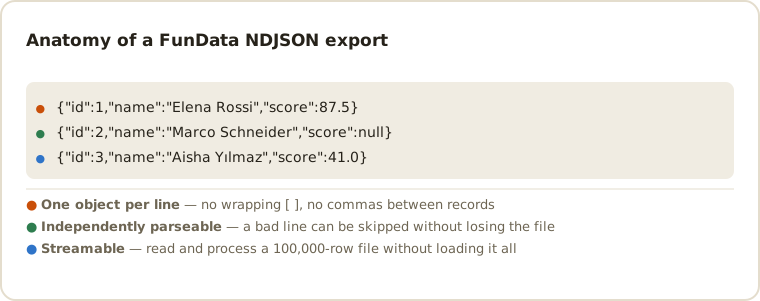
Why NDJSON?
Newline-delimited JSON keeps JSON's typed values but drops the enclosing array, so each line is a complete, independently parseable record. Tools can process line one before line two exists — which is exactly what log pipelines, bulk loaders and streaming consumers want, and why NDJSON is the native ingestion format for Elasticsearch, BigQuery and most log tooling.
Where NDJSON shines
jqpipelines — filter, group and reshape records without loading the whole file.- Elasticsearch — interleave with action lines for the
_bulkAPI. - BigQuery —
bq load --source_format=NEWLINE_DELIMITED_JSONtakes the file as-is. - Big exports — 100,000 rows stream through line-based tools with constant memory.
Loading NDJSON into streaming tools
Everything below reads the file a line at a time, so a 100,000-row export costs the same memory as a 10-row one.
# Group by country without loading the file (-s would slurp it; this doesn't)
jq -s 'group_by(.country) | map({country: .[0].country, users: length})' \
   fundata_10000_rows.ndjson

# Filter to the rows you care about, still line by line
jq -c 'select(.temperature_c < 0)' readings.ndjson > freezing.ndjson

# BigQuery — the format is native, no schema conversion step
bq load --source_format=NEWLINE_DELIMITED_JSON --autodetect \
   mydataset.readings readings.ndjson

# Elasticsearch _bulk — interleave an action line before each record
jq -c '{ index: {} }, .' readings.ndjson \
  | curl -s -H 'Content-Type: application/x-ndjson' \
         --data-binary @- localhost:9200/readings/_bulk

# DuckDB reads it directly
SELECT country, count(*) FROM read_json_auto('readings.ndjson') GROUP BY 1;
NDJSON compatibility and edge cases
Each UTF-8 line is a complete JSON object with no outer array and no trailing comma.
Newlines inside string values are escaped, so one physical line always equals one
record. This is also called JSON Lines or .jsonl; the content model is the
same even when tools prefer a different extension. Native numbers, booleans and
nulls are preserved exactly as they are in JSON export.
- The whole point is partial failure. One malformed line costs you one record, not the file. A pipeline that aborts the entire load on a single bad line is throwing away NDJSON's main advantage — generate a large export and corrupt one line to find out which behaviour you actually have.
-
The trailing newline matters. Files end with a newline after the last
record. Some bulk endpoints, Elasticsearch's
_bulkamong them, reject a payload whose final line is unterminated. - Don't pretty-print it. Indented JSON spans multiple physical lines, which breaks the one-line-one-record contract every consumer here relies on. This is why the NDJSON export is compact while the JSON export is indented.
-
Concatenation is the merge operation. Two NDJSON files join with
cat, with no header to strip and no brackets to reconcile. That makes it the practical choice when you need more than 100,000 rows: export several times with different seeds and concatenate. -
Line-splitting is not always byte-splitting. Tools that split on
\nwithout decoding UTF-8 first are safe here, because a newline byte can't appear inside a multi-byte character — but the same is not true of naive fixed-size chunking.
Common NDJSON questions
What is the difference between JSON and NDJSON?
JSON export wraps all records in one array. NDJSON writes one object per line, which lets streaming tools process records independently without parsing the entire file first.
Can I use the file as JSONL?
Yes. NDJSON and JSON Lines use the same one-object-per-line structure. Rename the extension to .jsonl when a particular importer expects it.
How do I generate more than 100,000 rows?
Export several times with different seeds and concatenate with cat. NDJSON is the one format where this needs no cleanup — there is no header to strip and no enclosing array to reconcile, so the joined file is immediately valid.
Why is the NDJSON compact when the JSON export is indented?
Because indentation would break it. NDJSON's contract is one record per physical line, and pretty-printed JSON spans several. The JSON export is indented for readable fixture diffs; NDJSON stays compact so streaming consumers work.
Can I feed this straight into Elasticsearch's bulk API?
Almost — _bulk expects an action line before each document. Pipe the export through jq -c '{ index: {} }, .' to interleave them, and make sure the payload ends with a newline, which the export already does.
For ingestion fixtures and repeatable pipeline tests, see QA test-data patterns.
Other formats
The same schema exports to all six formats — switch with one dropdown: CSV, TSV, JSON, SQL, XML. New here? Start with the getting-started guide or the full field type reference.
Last updated